Connect Every Job

Your Entire Service Operation. In One Place.

From the first service call to the final invoice, WorkPilot keeps your jobs, technicians, customers, and paperwork connected — so your team can spend less time managing work and more time getting it done.

Less paperwork.Smarter workflows.Work from anywhere.
The problem

Still Managing Jobs With Paperwork and Spreadsheets?

Most service businesses run on a patchwork of phone calls, notebooks, spreadsheets and paper job sheets. It works — until it doesn't. Pick one, or let them play.

Requests everywhere

Service requests scattered across phone calls, emails and messages — easy to miss, hard to track.

The WorkPilot way
Every request is logged as a service call, linked to the customer and site.

Your work is already complicated. Managing it shouldn't be.

How it works

One Connected Workflow. From Start to Finish.

WorkPilot brings your service operation together in one organized system, helping your office team and field technicians work from the same information.

  1. 01

    Service Calls

    Capture and organize customer requests — by trade, customer and site.

    New service call
  2. 02

    Work Orders

    Turn requests into structured work orders, with job details carried across.

    Work order created
  3. 03

    Job Cards

    Record work details, notes, to-dos, materials and job progress.

    Job card ready
  4. 04

    Scheduling

    Assign the right people to the right jobs, with availability in view.

    Assigned
  5. 05

    Mobile Execution

    Technicians open their jobs on a phone and update progress on site.

    In progress
  6. 06

    Completion & Records

    Complete the job with notes and a customer signature, and keep the record.

    Completed
  7. 07

    Invoicing

    Move completed work toward invoicing and see what has been billed.

    Invoiced

Plus labour and wage tracking. Timesheets, pay rates, overtime and approvals sit alongside your jobs, so labour costs are recorded as the work happens.

Features

Everything Your Service Business Needs to Keep Moving.

One system for the office and the field — built around how service work actually happens.

01 / 05

Service Calls & Work Orders

Log every request in one place and turn it into a structured work order.
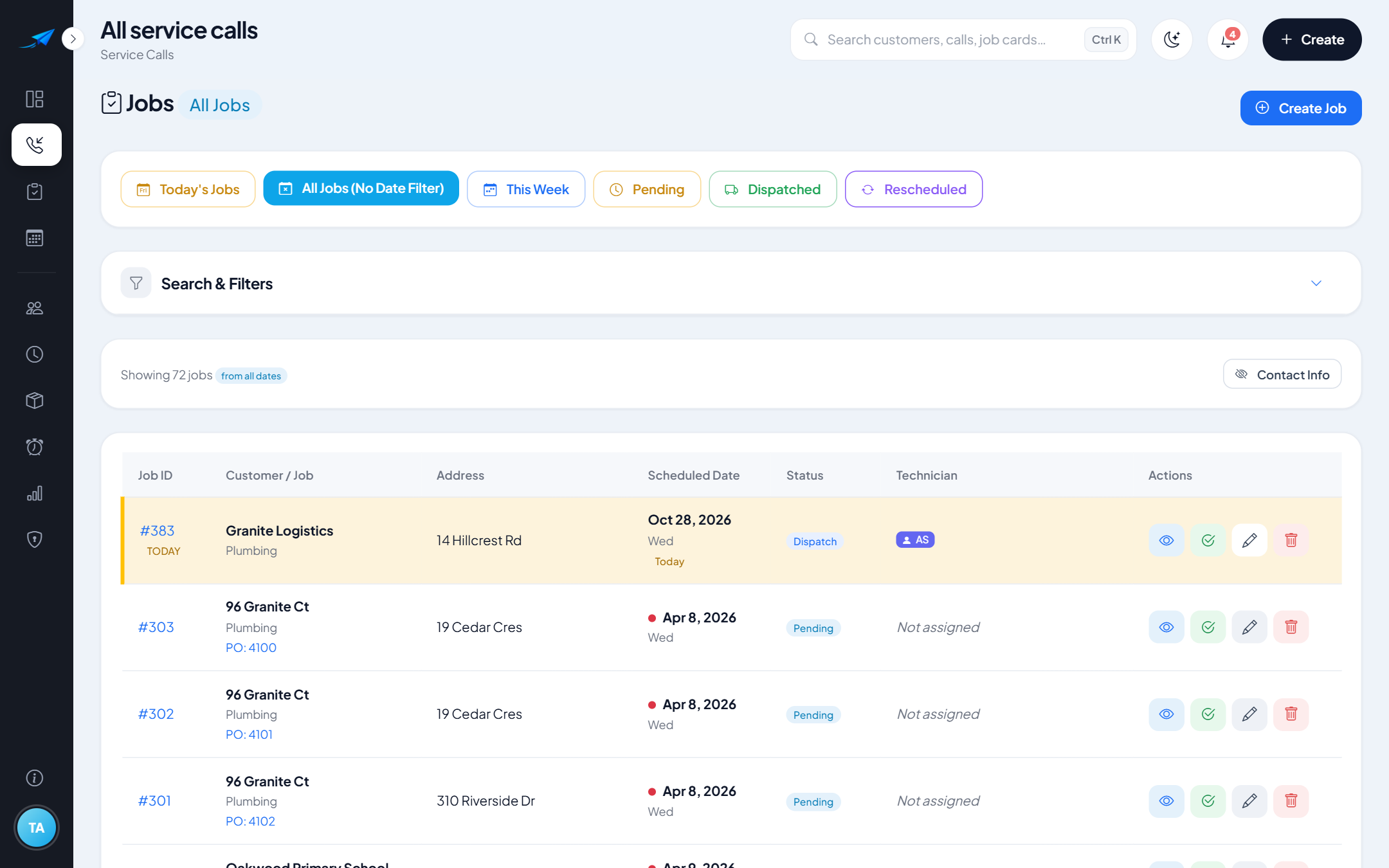
  • Service calls linked to the customer and site
  • Work orders created from jobs, with PO numbers
  • PDF work orders, approvals and mark as invoiced
  • Pending, assigned, in progress, completed — always know where each job stands
Book a Free Demo
workpilot · Service calls
WorkPilot service call list
02 / 05

Job Cards & Mobile Workforce

Step-by-step job cards that technicians complete from their phone browser.
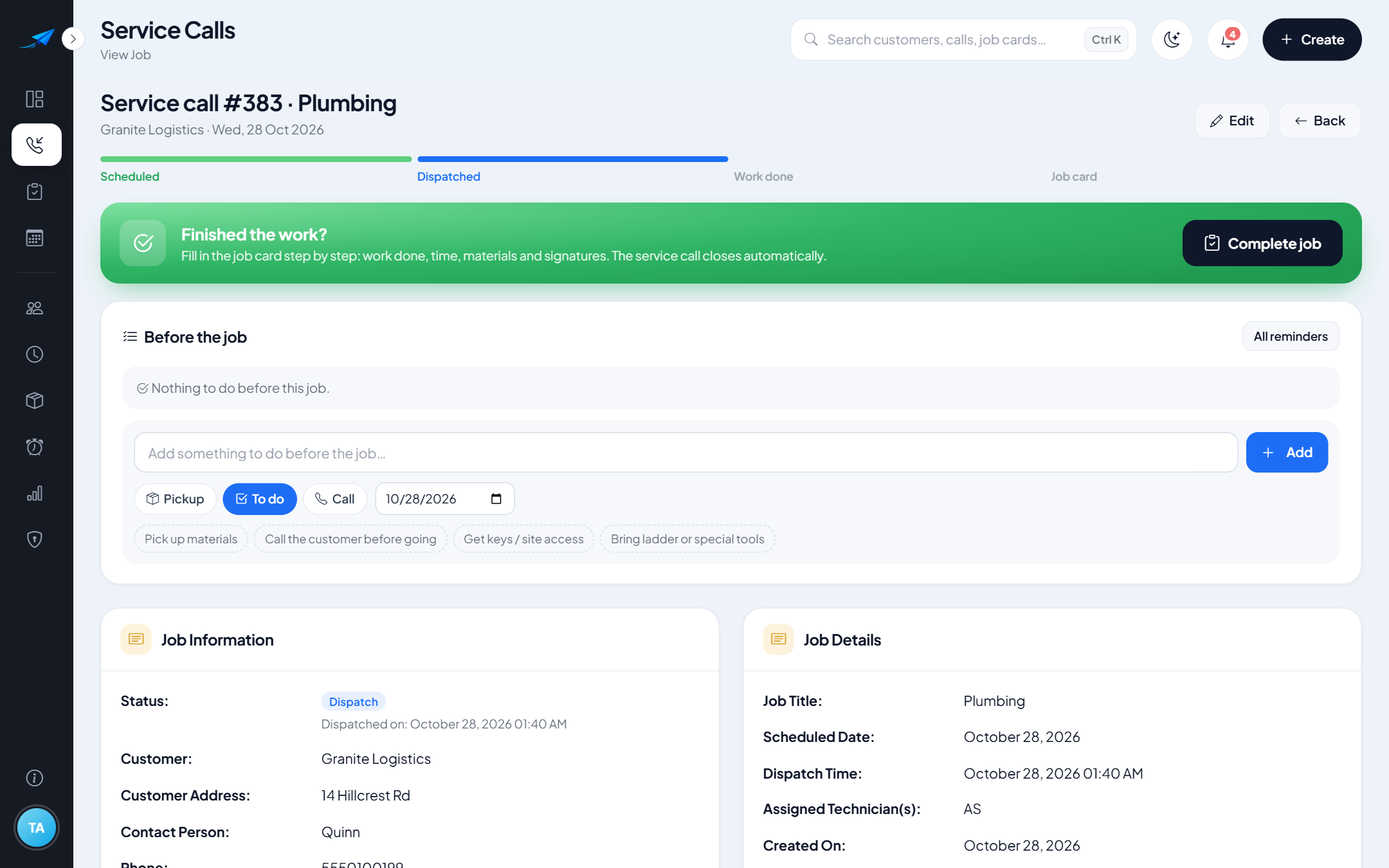
  • To-dos, notes and materials on every job card
  • Material suggestions from your inventory as you type
  • Customer signatures captured on site
  • Technicians see their schedule and complete jobs on a phone
Book a Free Demo
workpilot · Job card
WorkPilot job card
03 / 05

Scheduling & Customers

Assign the right people to the right jobs, with customer records close at hand.
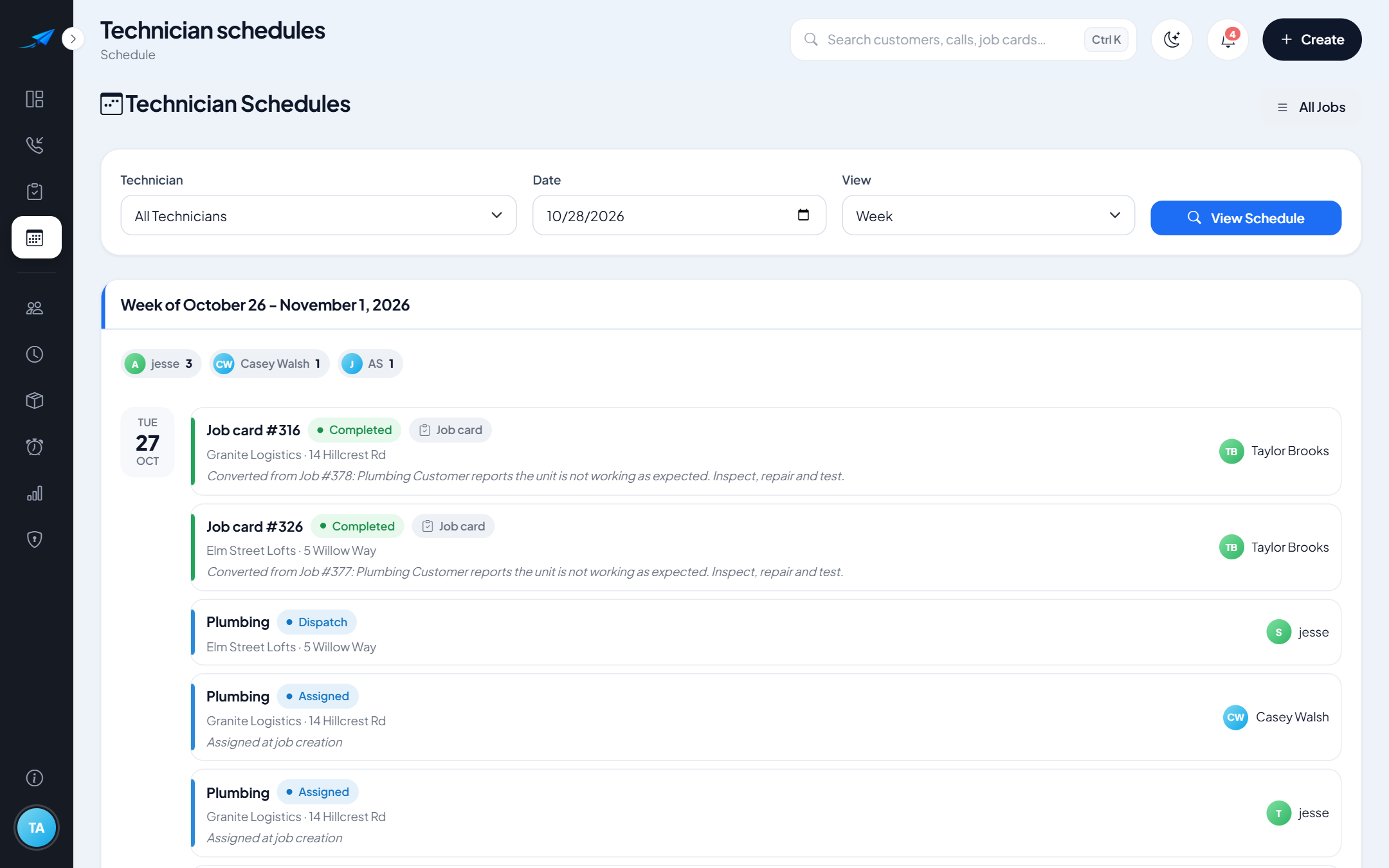
  • Assign and dispatch jobs to technicians
  • Technician availability and calendars
  • Customer and site records with job history
  • Import your existing customer list
Book a Free Demo
workpilot · Schedule
WorkPilot technician schedule
04 / 05

Labour, Wages & Invoicing

Record labour as the work happens and move completed jobs to billing.
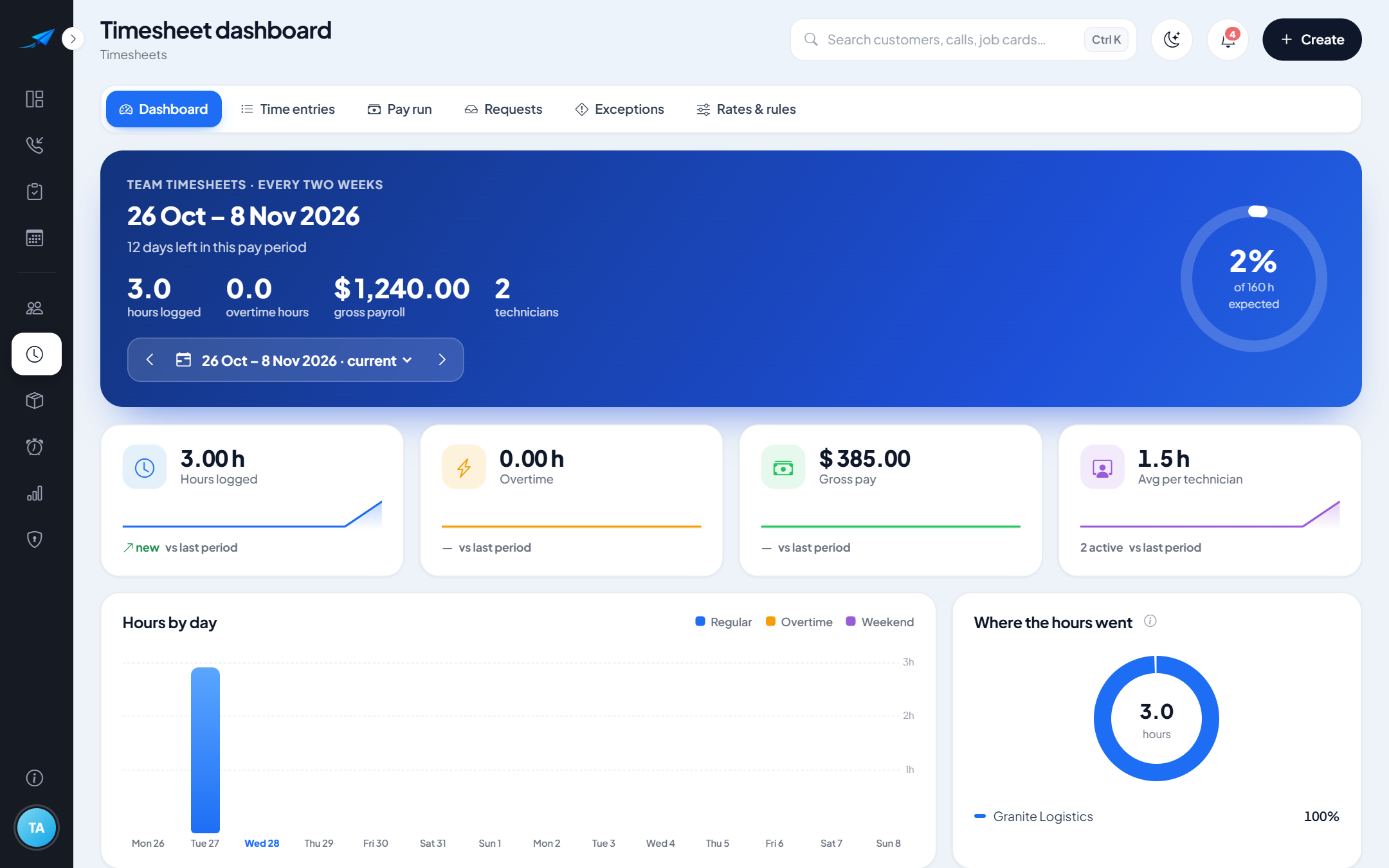
  • Timesheets with pay rates and overtime
  • Approve-and-lock pay periods and payslips
  • Invoices created from completed work
  • See what has — and hasn’t — been invoiced
Book a Free Demo
workpilot · Timesheets
WorkPilot timesheets and payroll
05 / 05

Inventory, Records & Reports

Keep stock, records and reporting in the same system as your jobs.
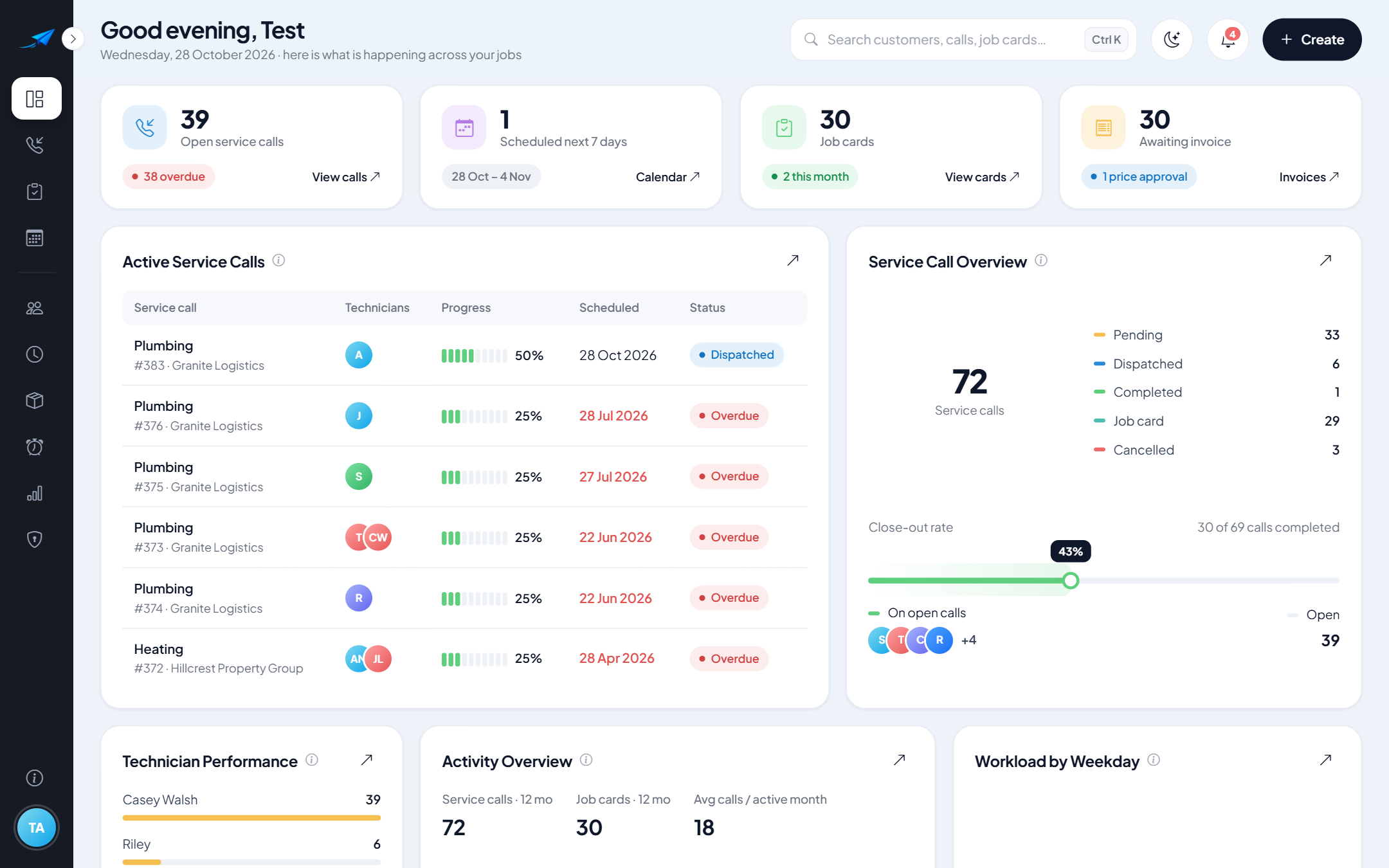
  • Items, stock locations, goods received and transfers
  • Stocktakes and materials used on jobs
  • Jobs, notes and signatures stored together, with an audit log
  • Reports on jobs, work orders, invoices and technician time
Book a Free Demo
workpilot · Dashboard
WorkPilot dashboard
Paperless work

Say Goodbye to Unnecessary Paperwork.

Move everyday service operations into a connected digital workflow. Keep job details, assignments, updates, and records organized without relying on piles of paper.

  • Digital service records and electronic job information
  • Faster access to work details — in the office or on site
  • Fewer repetitive administrative steps
  • Less manual data entry: job details carry into work orders
  • Better visibility across the whole workflow
  • Organized information for office teams and field staff

WorkPilot helps you cut down paperwork — some customers and jobs may still need paper, and that's fine.

Connected workflow

Let Your Workflow Do More of the Work.

When every step lives in the same system, information moves forward with the job — so your team spends less time copying details and chasing updates.

Service request

Logged once, with customer and site details.

New call

Assigned & scheduled

Appears on the technician's schedule.

Assigned

Job card updated

Progress, materials and signature recorded on site.

Completed

Work order & invoice

Job details carried across, ready for billing.

Invoiced

Built in WorkPilot handles

Things the system does for you as work moves along.

  • Carries job details into the work order — no retyping
  • Suggests materials from your inventory as technicians type
  • Shows in-app notifications and reminders for upcoming and overdue work
  • Calculates hours and overtime from timesheets using your pay rates
  • Keeps job status, records and an audit trail in one place

You decide Your team stays in control

Quick, guided steps that still need a person — made faster because the information is already there.

  • Turning a service call into a work order
  • Assigning and dispatching technicians
  • Approving timesheets and locking pay periods
  • Preparing invoices and marking work as invoiced
Job card · JC-2318Boiler service
Hillcrest Residence
14 Hillcrest Rd
Today · 10:30 – 12:00
Instructions
Annual service. Customer reports low pressure in the mornings.
Check pressure
Clean burner
Add work notes
Update status
Status updatedOffice sees it instantly
Signature capturedSaved to the job
Work anywhere

Your Office Goes Wherever the Job Takes You.

Give your team the freedom to manage work directly from their phones. Access job information, update progress, and keep the office informed while out in the field.

  • View assigned jobs
  • Customer & site details
  • Job instructions
  • Update job status
  • Record work notes
  • Complete jobs step by step
Large, touch-friendly controlsMobile-friendly formsEasy navigationSame data as the office

WorkPilot runs in the phone's web browser — there's nothing to download from an app store.

Office manager · Desktop
workpilot · Schedule
Today's schedule
JobTechnicianStatus
Boiler serviceJ. TremblayCompleted
AC not coolingM. GagnonIn progress
Panel inspectionR. MacDonaldAssigned
Technician · Phone
Boiler serviceJob completed
All tasks done
Signature captured
Completed ✓
Inside WorkPilot

See the Real Product.

A closer look at the screens your office team and technicians use every day.

Your day at a glance: open calls, today's jobs and work ready to invoice.

Who it's for

Built for Businesses That Keep the World Running.

If your business takes service requests, sends people to site and bills for the work, WorkPilot fits the way you already operate.

Plumbing & heating

HVAC & refrigeration

Electrical contractors

Property maintenance

Equipment servicing & repairs

Facilities management

General field service

One connected workflow

Service requests, jobs, field staff, records and billing — managed together, whatever your trade.

Benefits

More Control. Less Administration.

Less time on paperwork and phone tag. More time on the work your customers pay for.

Book a Free Demo
  1. 01Reduce paperwork and duplicated data entry
  2. 02Keep service jobs organized
  3. 03Improve coordination between office and technicians
  4. 04Access work information from mobile devices
  5. 05Track job progress more clearly
  6. 06Reduce delays in preparing invoices
  7. 07Keep records in one central place
  8. 08Spend less time chasing updates
Pricing

Powerful Tools. Without Enterprise-Level Complexity.

WorkPilot is designed to make organized service management accessible to small and growing businesses.

Simple, straightforward plans

Priced for small and medium-sized service businesses — no long setup projects, no features you'll never use.

  • Straightforward, affordable pricing
  • Plans that grow with your team
  • No unnecessary complexity
  • A free demonstration before you decide
Pricing tailored to your team size

Book a free demo and we'll walk you through WorkPilot and the plan that fits your business.

Book a Free Demo
Free demo

See How WorkPilot Fits Your Business.

Book a free demonstration and discover how WorkPilot can simplify your daily operations — from the first service call to the final invoice.

  • A walkthrough based on how your business works
  • See the office and technician views side by side
  • Ask questions — no obligation
Prefer email?info@Wpilot360.com
Please enter your name.
Please enter your business name.
Please enter a valid email address.
Please choose your type of business.

We'll use your details only to arrange your demo and reply to your request. We don't sell your information. See our Privacy Policy.

FAQ

Questions, Answered.

What is WorkPilot?
WorkPilot is field service management software. It connects service calls, work orders, job cards, technician scheduling, timesheets and invoicing in one system for your office team and technicians.
What types of businesses can use WorkPilot?
Service businesses that take customer requests and send staff to site — for example plumbing and heating, HVAC and refrigeration, electrical, property maintenance, equipment servicing and facilities management. Book a demo and we'll show you how it fits your workflow.
Can WorkPilot manage the complete service workflow?
Yes — from logging the service call, through work orders, job cards, scheduling and on-site completion, to invoicing. Labour, timesheets and inventory are managed in the same system.
Can technicians use WorkPilot on their mobile phones?
Yes. Technicians open WorkPilot in their phone's web browser to see their schedule, view job details, tick off tasks, add notes, capture customer signatures and complete jobs. There's no app-store download.
Does WorkPilot help reduce paperwork?
Yes. Job cards, work orders, signatures and timesheets are digital, and job details carry forward so they don't have to be rewritten. Most businesses find they need far less paper day to day.
Can I manage work orders and job cards?
Yes. Create work orders from jobs, record PO numbers, produce PDF work orders, and use digital job cards with to-dos, notes, materials and signatures.
Can I track labour or wages?
Yes. WorkPilot includes timesheets, pay rates, overtime, approvals with period locking, payroll reports and payslips.
Does WorkPilot support invoicing?
Yes. You can create invoices for completed work and mark work orders as invoiced, so you can see what has and hasn't been billed.
Is WorkPilot affordable for small businesses?
WorkPilot is designed for small and growing service businesses, with straightforward pricing. Book a free demo and we'll recommend the plan that fits your team.
How do I request a free demo?
Fill in the demo request form or email us at info@Wpilot360.com.
How do I log in to WorkPilot?
Existing customers can use the Login button at the top of this page to go to the WorkPilot application.

Ready to Put Your Work in Motion?

Bring your service calls, jobs, technicians, and invoices together with WorkPilot.